AI Art Critic
Sketch to finished art, on iPhone and iPad
Turn rough doodles and photos into polished AI renders. Draw on canvas, dictate your idea, compare five top models in one submit, get art-direction bullets, then mark up results and run again.
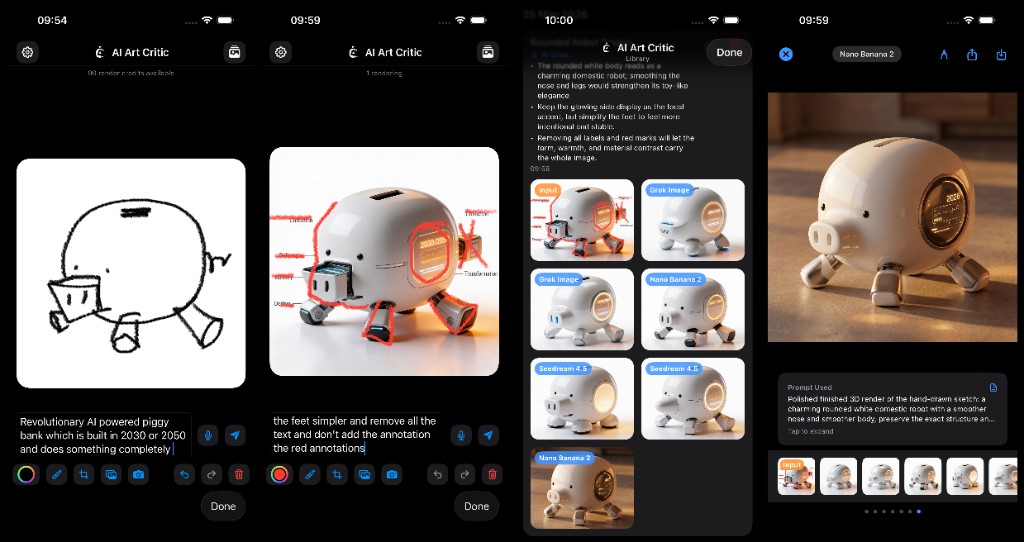
Overview
AI Art Critic is an iOS creative tool from Arvolve Ltd, London. Turn sketches, photos, and text into finished AI renders inside one loop: draw, describe, submit to multiple models, review art-direction feedback, then iterate by annotating outputs and resubmitting.
A rough doodle and a few words is enough. No account. No subscription. Everything stays on your device.
Built for concept artists, designers, illustrators, and students who want to explore ideas visually without prompt-engineering friction.
How it works
- Draw — PencilKit canvas with ink and brush tools, full color picker, adjustable size and opacity. Sketch freehand or draw over a photo from camera or library.
- Describe — Type a prompt or tap the mic and dictate live. Speech streams into the prompt field as you speak.
- Submit — One tap fans out to multiple state-of-the-art image models simultaneously. Results land in a labelled grid.
- Review — An AI art director critiques your idea and returns 1-3 directional bullets on every Library card.
- Iterate — Open any output full-screen, draw over it (red-marker workflow), revise the prompt, and resubmit. Or tap Edit Again to reload the original input.
Every submission is saved locally, grouped by day, with input thumbnail, critic bullets, and all outputs labelled by model.
Feature highlights
- Multi-model generation — submit once, compare Grok Image, Seedream 4.5, GPT Image 2, Nano Banana 2, and Flux 2 Max side by side
- AI art critic — vision-aware art direction bullets grounded in what the model actually sees in your input
- Draw + annotate — PencilKit with undo/redo (40 steps). Draw over any generated image to direct the next pass
- Voice to prompt — live speech-to-text in the composer
- Reference images — camera, Photos, or crop/pan/pinch to reposition within square, portrait, or landscape aspect ratios
- Full-screen gallery — swipe between input and outputs, pinch to zoom, inspect the exact prompt used per image
- Save and share — save to Photos or share via the system sheet, including batch select from Library
- Background rendering — jobs continue when you leave the app. Local notification on completion
- Smart titles — projects auto-named by an LLM reading your intent and input
- Offline library — browse past work without a connection. No login required
Pricing
| Download | Free |
| Starter credits | 10 credits on first install |
| 20 credits | $2.99 |
| 100 credits | $14.99 |
| 350 credits | $49.99 |
1 credit = 1 generated image from 1 model. Submitting to all five models with one image each costs 5 credits. Credits are reserved up front; failed slots refund automatically.
Consumable in-app purchases via Apple StoreKit 2. No ads. No subscription.
Built with ArX
AI Art Critic runs on ArX, Arvolve’s proprietary AI engine at api.arvolve.ai. The app routes LLM and image requests through ARX to upstream providers. Your library, settings, and cached outputs stay on device.
Roadmap
- 3D from 2D — generate 3D models from sketches and renders inside the same workflow
- macOS + iPadOS — native desktop and expanded tablet sessions
- On-device AI — private, offline critique and generation on supported hardware
Legal
Compatibility
Download
Free
Credit packs sold in-app via Apple
In-app credit packs